
Program
Begin your journey with a guided learning path. Each Core Section builds on the last. Provision homelabs, conduct attacks, and deploy real-world defenses using step-by-step guides and videos.
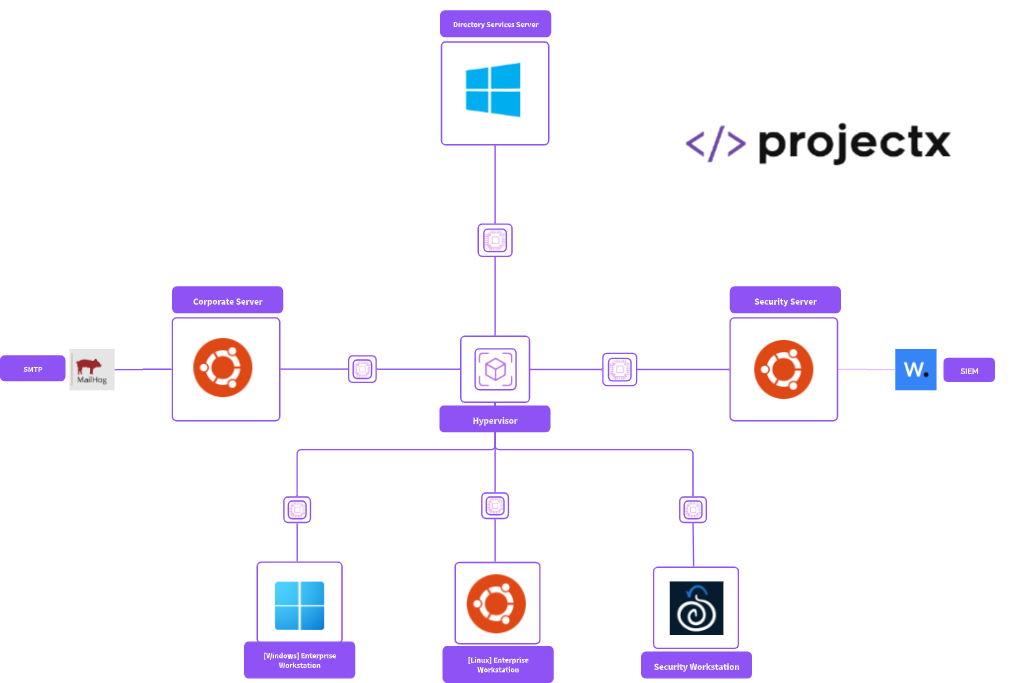
Infrastructure & Enterprise 101
Free
Begin your homelab build with a simulated enterprise style network.
Build
A complete enterprise network from scratch. Provision VMs - Windows Server 2025, Windows 11, Ubuntu, Security Onion, Email Server, Active Directory, configure DNS/DHCP, user identities.
Break
Setup and configure your attacker environment using Kali Linux. Deploy an end-to-end cyber attack using the cyber kill chain.
Secure
Deploy Wazuh SIEM + EDR. Write detection rules to catch attacker activity and harden your environment to prevent repeat attacks.

Networks & Attacks 101
Homelab Builder Tier
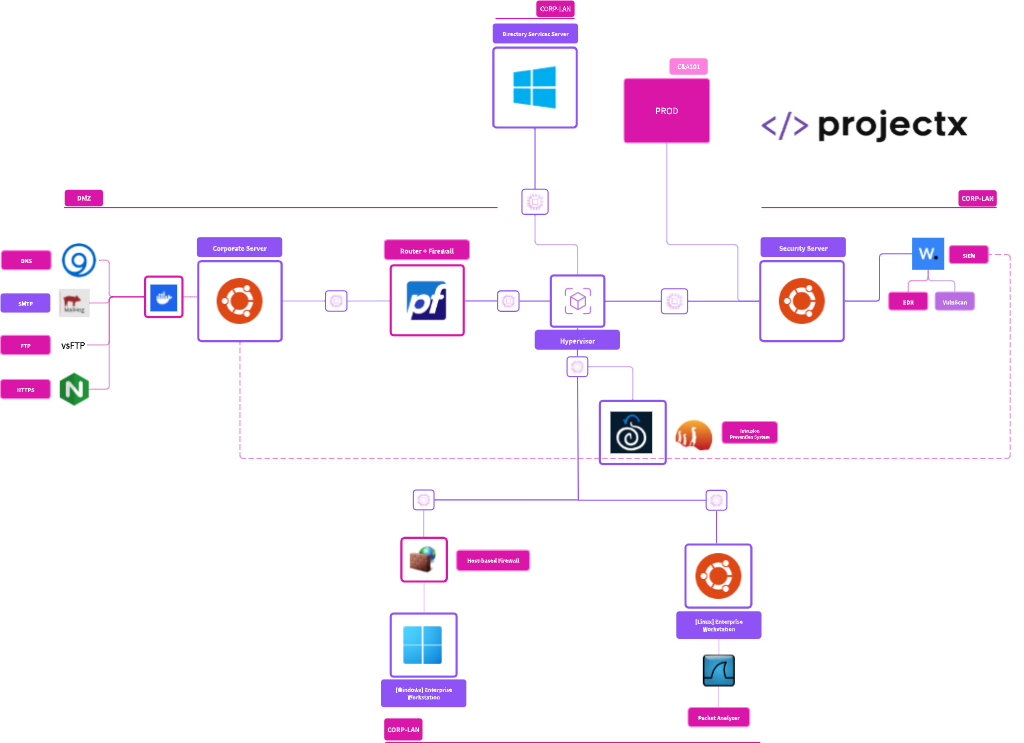
Expand and advance to a fully functional corporate network with internal servers, architecture, and security tooling.
Build
Expand and deploy corporate enterprise infrastructure, including internal DNS resolver, internal FTP server, a HTTPS corporate web portal, a corporate router through pfSense, segment with secure network architecture, a DMZ, CORP-LAN.
Break
Conduct network style attacks ARP poisoning, DNS spoofing, IP Spoofing, a DoS attack, credential stuffing, and write and deploy a mini C2 server written in Python.
Secure
Defend with network Layer 2–7 monitoring through pfSense, Suricata, ARP Watch, Security Agents, AD GPO, and DNS security.
Cloud & Attacks 101
Homelab Builder Tier
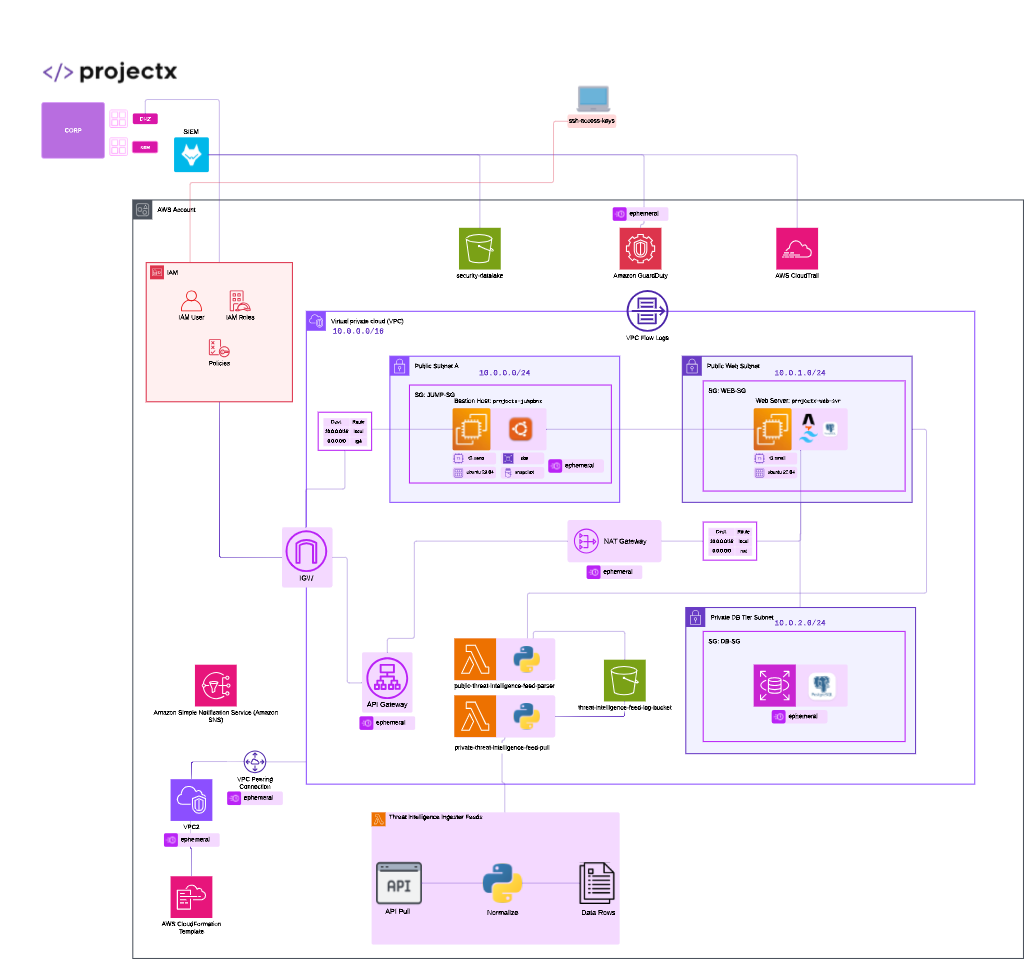
Build and roll out a production network using AWS. Deploy an environment to serve a live threat intelligence application. Connect security tooling back into the corporate network.
Build
A fully functional production network using AWS free tier, deploy a VPC, with EC2 VMs, EBS storage, RDS, PostgreSQL, S3 Security Datalake, CloudTrail, VPC Flow Logs, Lambda serverless. This sets up a real-world web application.
Break
Conduct cloud-based attacks, including a leaky S3 bucket, Metadata SSRF attack, probe for and exploit an insecure API gateway, hunt for hardcoded secrets, insecure IAM, and opened VPCs.
Secure
Add VPC Flow Logs and CloudTrail to power customized detections, deploy AWS Config to catch misconfigurations and use secure infrastructure, AWS Secrets Manager, and SSM.
Web & Attacks 101
Homelab Builder Tier
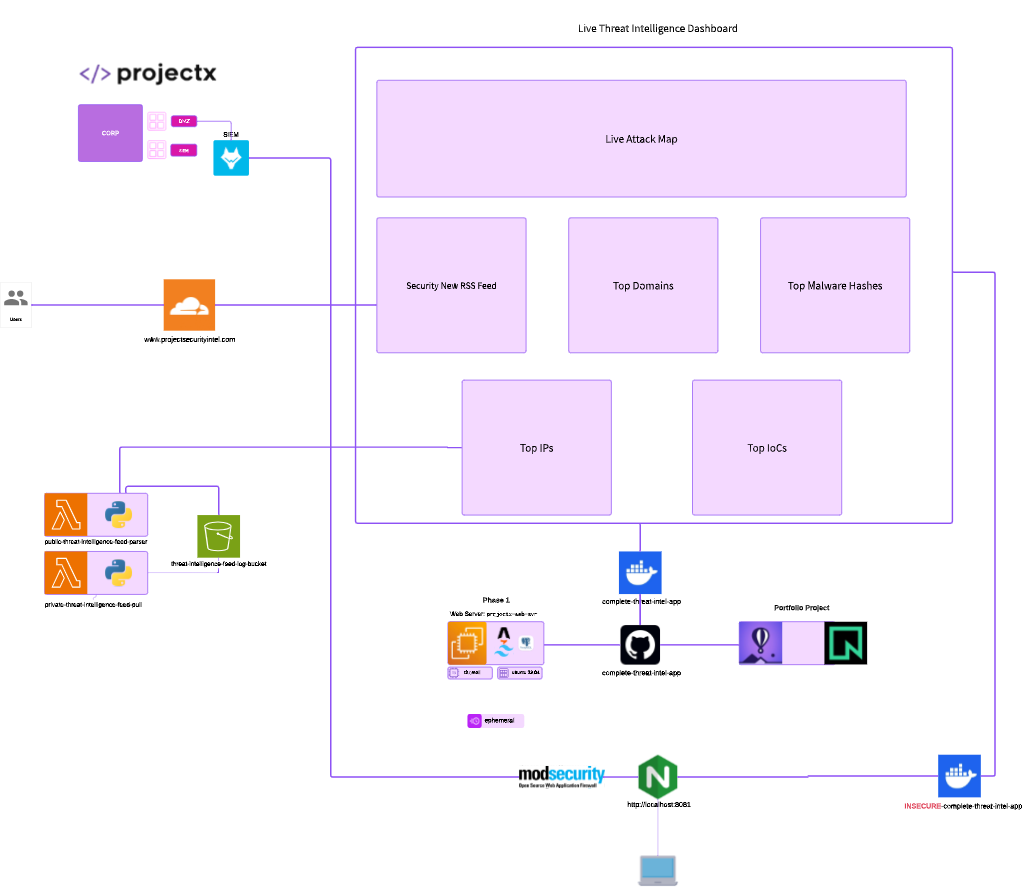
Deploy a live threat intelligence web application tracking updated security information and attacks on nearly free tech stack.
Build
A live threat intelligence web application tracking updated security information and attacks. Deploy a live threat intelligence application on near free application stacks.
Break
Conduct SSRF, XSS, CSRF, Command Injection, IDOR, SQLi in a localized insecure threat intelligence web application. Use Burp Suite to probe for and test web vulnerabilities.
Secure
Add a ModSecurity WAF and understand secure coding practices.

Frequently Asked Questions
Who is this made for? And Are There Any Prerequisites?
Once I sign up, what happens?
Is this platform free?
How can I get more involved?
Do you offer technical support?
What are minimum computer specifications needed?
Should I use VirtualBox or VMware Workstation Player?
Is the Homelab Builder Worth it?
Is any coding knowledge required for the threat intelligence application?
If you had one cyber super power, what would it be?
Ready to start building?
Pick a core section and start building your homelab today. No experience required.